Microsoft Visio 2007 Professional and 2010 Professional and Premium includes the Network / Rack Diagram template, which opens the Rack-mounted equipment stencil. This stencil includes the Patch Panel master which can be stretched from 2U to 25U high. However, I have often required a 1U patch Panel, so I decided to look into the Microsoft shape to see if it could be modified to allow it to be reduced to 1U without looking ridiculous.
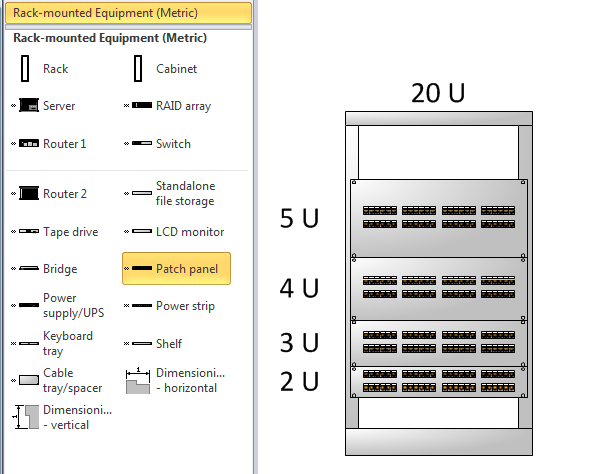
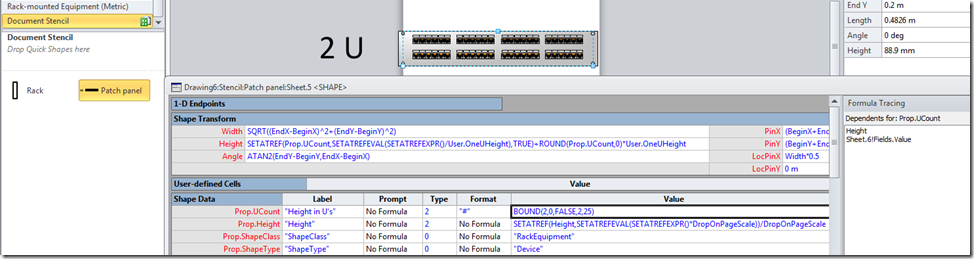
I opened up the ShapeSheet of the Patch Panel master and found that the formula in the Prop.UCount.Value cell is imposing 2 as a minimum value with the BOUND() function.
I changed the formula to =BOUND(2,0,FALSE,1,25), and was then able to change the UHeight to 1U, but the 24 ports remained visible:
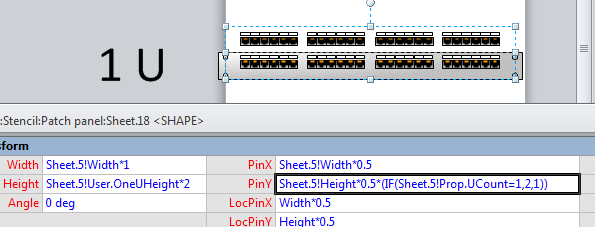
I actually wanted the number of ports to be halved to 12, so I set about exploring the sub-shapes in the master. I found that Sheet.18 contains the port shapes, and that its height is fixed at 2 Us. All of its sub-shapes have a height formula referencing this height, so I decided to modify the PinY formula to =Sheet.5!Height*0.5*(IF(Sheet.5!Prop.UCount=1,2,1)) so that it would move the lower bank of ports up into the correct position if the Prop.UCount equals 1.
Then it was just necessary to go through each of the sub-shapes of Sheet.18 to modify the GeometryX.NoShow formula to =Sheet.5!Prop.UCount=1 for each Geometry section which is in the upper half of the shape.

At this point, I could see that I had to put this formula into 12 geometry sections of 4 shapes, which is 48 copy and pastes! Therefore, I decided to write some VBA code to do this instead. This has the advantage that you can run the code on existing documents that already have the Patch panel master in it. In fact, the Patch panel master must be in the local document stencil for this code to work.
1: Public Sub UpdatePatchPanelMaster()
2: Dim mst As Visio.Master
3: Dim mstCopy As Visio.Master
4: Dim shpPatchPanel As Visio.Shape
5: Dim shpPortGroup As Visio.Shape
6: Dim shpPortGraphics As Visio.Shape
7: Dim i As Integer
8: Dim iSect As Integer
9: Dim dHeight As Double
10:11: For Each mst In Visio.ActiveDocument.Masters
12: If mst.Name = "Patch panel" Then
13: Set mstCopy = mst.Open
14: Set shpPatchPanel = mstCopy.Shapes(1)
15: For Each shpPortGroup In shpPatchPanel.Shapes
16: If shpPortGroup.Cells("Height").FormulaU = _
17: "Sheet.5!User.OneUHeight*2" Then
18: shpPortGroup.Cells("PinY").FormulaU = _
19: "=Sheet.5!Height*0.5*(IF(Sheet.5!Prop.UCount=1,2,1))"
20: For Each shpPortGraphics In shpPortGroup.Shapes
21: dHeight = shpPortGraphics.Cells("Height").ResultIU
22: For i = 0 To shpPortGraphics.GeometryCount - 1
23: iSect = Visio.visSectionFirstComponent + i24: If shpPortGraphics.CellsSRC(iSect, _
25: Visio.visRowComponent + 1, _26: Visio.visY).ResultIU > dHeight * 0.5 Then
27: shpPortGraphics.CellsSRC(iSect, 0, _ 28: Visio.visCompNoShow).Formula = _29: "=Sheet.5!Prop.UCount=1"
30: End If
31: Next i
32: Next shpPortGraphics
33: Exit For
34: End If
35: Next shpPortGroup
36: mstCopy.Close37: mst.MatchByName = True
38: Exit For
39: End If
40: Next mst
41:42: End Sub
And there you have it … the Patch panel can now be reduced to 1 U and it looks OK!
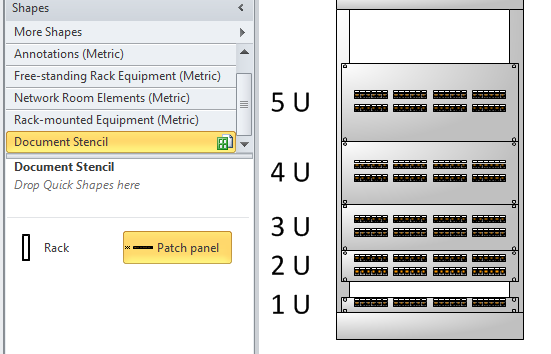
If you cannot be bothered to run the code, you can download the updated Patch panel and the code from here : click here

davidjpp, great example, tanks you, from Chile.!!!
Thanks … from England!
Thanks!!
Thanks for figuring this out. Special thanks for the “If you cannot be bothered” .vsd link : )
Thx a lot mate
Thanks a lot from taiwan
Thanks from George, South Africa!
we need data center and floor idf contaiment stencil to be download in our current visio2007
Have you checked out the following ?
http://www.visiocafe.com/
http://www.nexans.co.uk/eservice/UK-en_GB/navigatepub_183256_-22013/New_Release_of_Nexans_Visio_Template_software_now_.html
I don’t know if it’s just me, but for some reason the file will only open with powerpoint, where I get an error. Visio won’t recognize the file to import. I can’t believe finding a 1U patch panel has held this thing up 4 hours. Please help.
Well, I have generated a new link for you to try :
http://sdrv.ms/JfFKkj
Thanks I copied it – works well
You are so kind in sharing! Thanks a lot from Sweden/Brazil
I get an error the PinY.
Standard value is: (BeginY+EndY)/2 what do I need to fill in here?
When do you get this error?
What language are you using?
I enter the following for English:
=Sheet.5!Height*0.5*(IF(Sheet.5!Prop.UCount=1,2,1))
But you may need a comma as the decimal point?
=Sheet.5!Height*0,5*(IF(Sheet.5!Prop.UCount=1,2,1))
Thanks from Texas!
Download link is dead.
I just tested it … it looks live to me.
How do we run this code? Where in Visio?
Just drag the Microsoft supplied Patch Panel into a document
Add the code into the VBA project of the document
Run the code
A good workaround and I like that you’ve changed to a VSD, however to make it easy, you can simply change the ShapeSheet data ‘User-defined Cells’, ‘User.OneUHeight’ to half of what it currently is, it will drop the height down.
This is my fix for the situation at least, it still looks like it’s a double panel, but it looks pretty 🙂
Thank you very much this is really help me….. thank you again – From Sri Lanka.
Thanks from Tomsk, Russia.
Nice .. it worked 🙂 Thanks much.
link is down, i need it please
Link updated! 🙂
Thank you so much
Brilliant! Never ceases to amaze me how companies can miss the little things when marketing their products….don’t think it makes a difference to have the “Visual Guy” use tools branded with your logo? Think again! His Visuals sell your product to the check writers! Your sales reps can’t do that!
Dude, thanks for this nifty tool! Couldn’t find a 24 port patch stencil anywhere! 🙂